WBS Element in SAP: How to Create, Change and Display It

To create a WBS element in SAP, use transaction CJ11. To change it, use CJ12, and to display it, use CJ13. If you work on a whole project rather than on a single element, use the Project Builder, CJ20N. This guide explains when to use each one, which fields matter, what the statuses mean, and how to solve the most common problems.
WBS element T-codes: which one to use
| T-code | Use it to | Best when |
|---|---|---|
CJ20N | Create, change and display WBS elements in the project tree | You need to see the structure, or work on several elements |
CJ11 | Create a single WBS element | You add one element and know its number |
CJ12 | Change a single WBS element | You know the number and want to go straight to it |
CJ13 | Display a single WBS element | You only need to check it |
CN43N | List WBS elements | You search by project, responsible person or status |
CN41N | Display the whole structure | You want WBS elements, networks and activities together |
The full list is on the SAP PS transaction codes page.
What is a WBS element in SAP?
WBS stands for work breakdown structure. A WBS element is one box of that structure: a deliverable, a phase or a work package of the project. WBS elements are arranged in levels under the project definition, and costs, revenues, budgets and dates can be planned and followed on them.
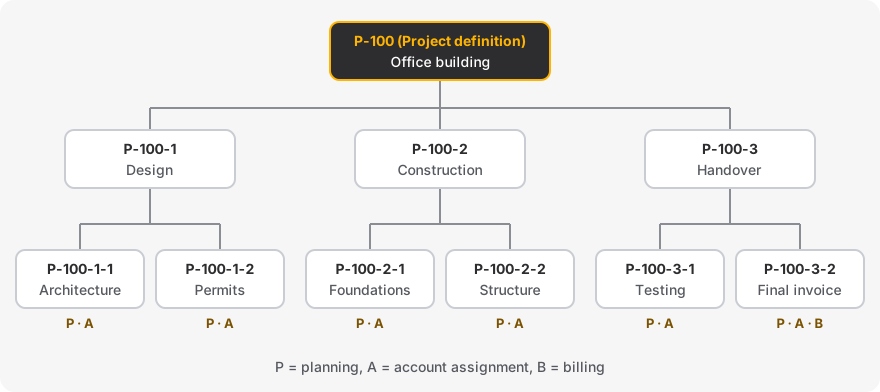
| Object | What it is for | Has a sequence? |
|---|---|---|
| Project definition | Holds the data that applies to the whole project | No |
| WBS element | Structures the project, and carries costs, revenues and budget | No, only a place in the hierarchy |
| Network activity | Describes the work: duration, resources, materials | Yes, through relationships |
See project structures to decide between a WBS, networks or both.
How to create a WBS element
With the Project Builder (CJ20N)
Start
CJ20Nand open the project.Select the project definition, or the WBS element that will be the parent.
Add a WBS element from the templates area, or open the WBS element overview and enter several at once.
Enter the number, which must follow the project coding mask, and a description.
Check the organizational data and set the operative indicators.
Save.
If the project does not exist yet, start with how to create a project in SAP PS.
With CJ11
Start
CJ11and enter the number of the new WBS element.Enter the project definition it belongs to and, if needed, the project profile.
Complete the description, the organizational data and the indicators.
Save, then check the position of the element in the hierarchy with
CJ20N.
From a template or in mass
Template: copy a standard WBS or the structure of an existing project in
CJ20N. This is the fastest way for similar projects.Program or interface: developers can use the BAPI
BAPI_BUS2054_CREATE_MULTIto create several WBS elements of a project.
The fields that matter
| Field | Why it matters |
|---|---|
| WBS element number | The identifier users see, formatted by the coding mask |
| Level | The position in the hierarchy |
| Project type and priority | Used for selection and reporting |
| Person responsible | Used in reports and authorizations |
| Company code, controlling area, profit center, plant | Determine where costs and revenues are posted. Often locked once there are postings |
| Operative indicators | Decide what can be planned and posted, see below |
| Budget, planning and settlement profiles | Control the corresponding functions. They normally come from the project profile |
The three operative indicators
| Indicator | Without it | Field in PRPS |
|---|---|---|
| Planning element | You cannot plan costs on the element | PLAKZ |
| Account assignment element | You cannot post actual costs or commitments, or assign orders, networks or purchase orders to it | BELKZ |
| Billing element | You cannot post revenues to it | FAKKZ |
Source for the three indicators: SAP Help, Basic Data (S/4HANA).
A common design is to allow postings only on the lowest level, and to use the higher levels for budget and reporting.
How to change a WBS element
Use CJ12 for one element, or CJ20N if you need to move it or change several elements. Before you change anything:
Check the status: some changes are refused when the element is technically completed or closed.
Check the postings: organizational data such as the company code usually cannot be changed once costs or commitments exist.
Check the level below: a change on a parent is not always passed on to its children.
How to display a WBS element
One element:
CJ13.A list:
CN43N, with filters and export.Its actual costs:
CJI3. Its commitments:CJI5.Its budget:
CJ31or reportS_ALR_87013558, see how to check the budget of a WBS element.Its data in the database: table
PRPSwithSE16N.
WBS element statuses
System statuses are set by SAP and control what is possible. The usual sequence is:
| Status | Meaning | Effect |
|---|---|---|
CRTD | Created | Planning is possible, actual costs cannot be posted yet |
PREL | Partially released | At least one element below is released, but not this one |
REL | Released | Actual costs can be posted |
TECO | Technically completed | The work is done. Remaining costs, such as late invoices, can still be posted |
CLSD | Closed | No further costs can be posted |
A release cannot be undone, whereas TECO and CLSD can normally be reversed. A WBS element added under a released parent may inherit the released status. Your company can also use its own user statuses to allow or forbid certain transactions.
How to delete a WBS element
No postings: delete it in
CJ20N. SAP warns you if plan values exist.Costs or commitments exist: it cannot be deleted physically. Settle it, close the open purchase orders and orders, then set the deletion flag, which prepares it for archiving.
See also Deleting WBS Elements in the SAP Help (an older release, so check the details in yours).
The WBS element table: PRPS
| Field | Content |
|---|---|
PSPNR | Internal number, used as the key in other tables |
POSID | WBS element number as users see it |
POST1 | Description |
PSPHI | Project definition (internal number), links to PROJ-PSPNR |
STUFE | Level in the hierarchy |
PBUKR | Company code |
OBJNR | Object number, links to statuses (JEST), costs (RPSCO) and budget (BPGE) |
Conversion exit ABPSP converts between the internal and the external number. If a number you find in a table does not match what users see, this is usually why. See SAP PS tables for the links between the tables.
Common problems and solutions
| Problem | Solution |
|---|---|
| The number is refused when you create the element | It does not match the coding mask of the project, or it already exists |
| Actual costs cannot be posted | Release the element, check that it is an account assignment element, and check its user status |
| Costs cannot be planned | Set the planning element indicator |
| Revenues cannot be posted | Set the billing element indicator |
| The posting is blocked by the budget | Check the assigned values in S_ALR_87013558, then follow the guide to fix budget exceeded errors |
| The company code cannot be changed | Postings probably exist. Creating a new element is usually the cleaner solution |
| The element cannot be closed or flagged for deletion | Check for open commitments (CJI5), unsettled costs, and open orders or networks |
Frequently asked questions
What is the T-code to display a WBS element in SAP?
CJ13 displays a single WBS element, and CN43N displays a list.
What is the T-code to create a WBS element?
CJ11 for a single element, or CJ20N to work in the project structure.
Which table stores WBS elements?
PRPS. The hierarchy between them is in PRHI.
Do these transactions still exist in S/4HANA?
The Project Builder (CJ20N) remains the main transaction, next to the Fiori apps. Some of the older single transactions may not be available in your release or edition, so check in your system. See what changed for SAP PS in S/4HANA.