WBS Budget in SAP: How to Check It and Fix Budget Exceeded Errors

To check the budget of a WBS element in SAP, run report S_ALR_87013558, which shows the budget, actual costs, commitments and assigned values side by side, or display the budget with CJ31. If a posting is refused because the budget is exceeded, compare the budget with the assigned value, not with the actual costs. This guide explains what counts as assigned, why two screens can show different figures, and how to solve the error.
Three ways to check a WBS budget
| Use | To see | Good for |
|---|---|---|
S_ALR_87013558 | Budget, actual, commitment, remaining plan and assigned | A quick overview of a project |
CJ31 | The budget per WBS element, and the availability control analysis | Understanding why a posting was blocked |
CJI3 and CJI5 | The actual and commitment line items | Finding the documents behind the figures |
For the basics, such as the original budget, supplements and transfers, see budgeting in SAP PS.
What counts as assigned
Availability control compares the budget with the assigned value of the WBS element that carries the budget. According to SAP Help, the assigned value is calculated like this:
| Counts | Does not count |
|---|---|
| Actual costs of the WBS element that carries the budget, including statistical actual costs | Costs planned directly on the WBS element |
| Actual costs and commitments of the WBS elements below it, if they do not carry a budget themselves | Costs on an exempt cost element |
| Commitments, such as purchase requisitions and purchase orders | Business transactions outside the groups checked by the tolerance limits |
| For assigned networks and orders, the higher of the plan and the actual costs plus commitments | Revenues |
| Costs received by settlement | Credits from a settlement to an object without budget control, such as a cost center |
The last line surprises many users: if you settle costs from a WBS element to a cost center, the budget is not given back. It is given back only if the receiver is itself controlled by a budget.
Worked example
A WBS element has a budget of 100,000. Only the following is assigned to it:
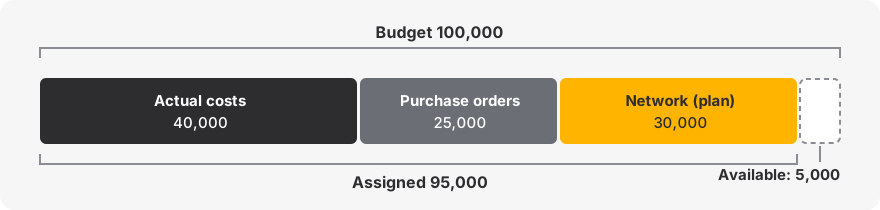
| Item | Amount | Assigned |
|---|---|---|
| Actual costs posted on the WBS element | 40,000 | 40,000 |
| Open purchase orders | 25,000 | 25,000 |
| Network: plan 30,000, actual and commitments 15,000 | the higher one | 30,000 |
| Total assigned | 95,000 | |
| Available | 5,000 |
A new purchase order of 8,000 would bring the assigned value to 103,000. It can be blocked, although the actual costs on the WBS element are only 40,000.
What happens when the budget is exceeded
The reaction depends on the tolerance limits, which are defined in customizing per controlling area, budget profile and activity group. According to SAP Learning, three actions are possible:
Warning: the user sees a message and can continue.
Warning and email to the person responsible for the project.
Error: the posting is refused.
The tolerance limit is a percentage of the budget, an absolute amount, or both. This is why an error may appear before or after 100% of the budget is used. The budget profile also decides whether the check is made against the current or the released budget, and against overall or annual values.
How to solve a budget exceeded error
The message usually belongs to class BP, for example BP603 or BP604. Work through these steps:
Read the message. Note the WBS element and the amount. The element named in the message is the one that carries the budget, which may be above the one you are posting to.
Compare budget and assigned for that element with
S_ALR_87013558, then look at the availability control analysis inCJ31.Check the year. If availability control uses annual values, the overall budget may be sufficient and the current year not.
Check the release. If control is based on released budget, the budget may exist but not be released (
CJ32).Look for old commitments in
CJI5. Purchase orders that will never be delivered or invoiced still use the budget.Check the networks and orders. A plan that is too high keeps budget reserved, as in the example above.
| Cause | Solution |
|---|---|
| The budget is really too low | Request a supplement (CJ36, CJ37) or a transfer (CJ34) |
| The budget sits on another WBS element | Transfer it with CJ34, or distribute it with CJ30 |
| The budget is not released | Release it with CJ32 |
| Old purchase orders or requisitions are still open | Close them: final delivery, final invoice, or deletion of the item |
| The network or order plan is too high | Adjust the plan, or complete the finished activities and orders |
| The costs were posted to the wrong element | Correct the posting |
| A cost element should not consume budget | Ask your consultant whether it should be an exempt cost element |
| The figures look wrong | See the next section |
Avoid deactivating availability control to let one document through. While it is off, nobody is warned about any other overrun.
Why CJ31 and S_ALR_87013558 can differ
It is a known situation: SAP describes it in KBA 2491647 (the full text requires an SAP login). Before opening an incident, check these points:
Selection: same version, period, fiscal year, currency and database profile in the report.
Level: availability control works on the element that carries the budget, while the report shows every level.
Exempt cost elements: excluded by availability control, but they can be included in the report.
Settlement: credits may reduce the costs in a report without giving back budget.
Data: the project information database used by reports can be rebuilt with
CJEN, and availability control withCJBN.
Run CJEN and CJBN only with your consultant or support team, outside working hours if possible, because other users should not post to the project in the meantime.
Good practices
Decide early at which WBS level budgets are controlled, and do not mix levels without a reason.
Set a warning below 100%, for example at 90%, so that project managers can react before postings are blocked.
Review open commitments every month, before requesting a supplement.
Close finished networks and orders, so that they stop reserving budget.
Frequently asked questions
How do I check a WBS budget in SAP?
With report S_ALR_87013558 for an overview, or CJ31 for the budget of each WBS element.
Does cost planning consume the budget?
Not when costs are planned directly on the WBS element, for example with CJ40. The plan of assigned networks and orders can consume it. See cost planning.
Does a purchase requisition consume the budget?
It can, because it creates a commitment, provided that this activity group is included in the tolerance limits.
Which table contains the budget of a WBS element?
BPGE for overall values and BPJA for annual values. See SAP PS tables.